It's Friday evening. You're leaving for the weekend in twenty minutes, and you want your handheld loaded with the right games: the JRPG you're actually playing, the pick-up-and-play arcade stuff for the train, and that batch of SNES games a friend recommended. You know how this goes. You open two file managers side by side. You squint at folder names. You try to remember what's already on the card. You start copying, realize halfway through that the card is going to fill up, cancel, delete some things you hope you weren't playing, copy again, and leave the house with the progress bar still crawling. Multiply that by every device you own and every trip you take, and "managing my handhelds" quietly becomes a part-time job. We built Klyport's Mirror to delete that job. Here's the thinking behind it.
The problem isn't copying files. It's answering three questions first. Loading a handheld is trivially easy once you know exactly what should move. The pain is everything before the copy:
What's already there? You can't diff two libraries by scrolling folders. So you either re-copy everything (slow, wasteful) or guess (and miss things). What fits? Cards and internal storage are finite. The moment a collection outgrows the device, every transfer becomes a manual triage session — and the usual failure mode is a copy that dies at 97% full. What's safe to remove? This is the one that keeps people doing everything by hand. Your device's folders don't just hold games — they hold saves, configs, themes, box art, the emulator's own files. One careless "select all → delete" in the wrong directory and you've nuked things no sync tool will give back.
Drag-and-drop answers none of these. Generic sync tools answer them badly — they'll happily "mirror" a folder by deleting whatever doesn't match, with no concept of which files are yours to manage and which are sacred. The community has been saying this for years: the dangerous part of keeping handhelds stocked isn't the copying, it's the cleanup. [Link to a relevant community thread/guide here.]
How Klyport handles it: curate once, mirror everywhere
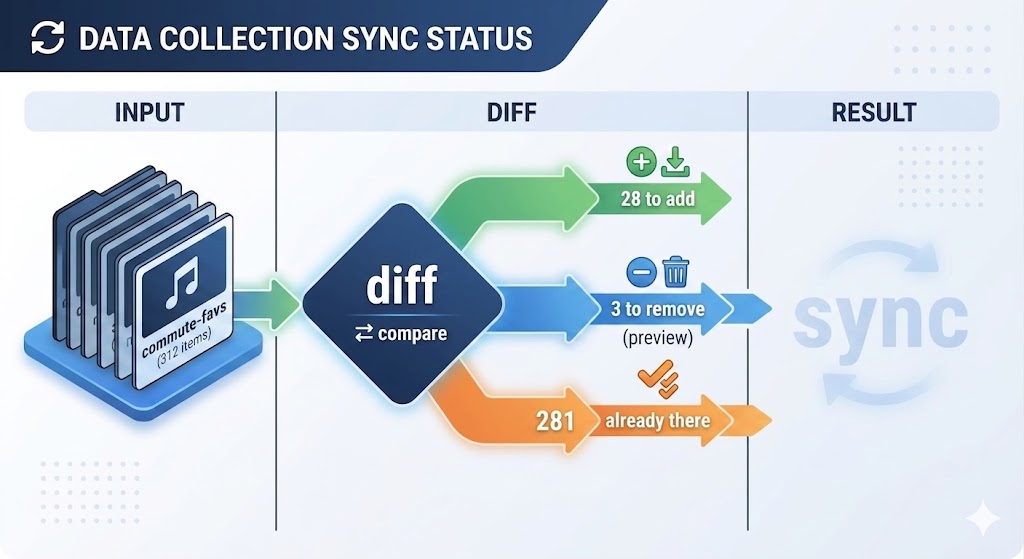
The unit of work in Klyport isn't a folder it's a collection. You curate one once ("commute favorites", "kids' games", "RPG backlog"), with manual picks or smart filters, and it becomes a portable definition of what a device should contain. Mirror makes a device match a collection, one-way, in a single pass. When you point a collection at a device, Klyport:
- Reads what's actually on the device and diffs it against the collection — what's missing, what's extra, what's already in place.
- Transfers only the delta. If 90% of the collection is already there, only the missing 10% moves. Your Friday-evening sync takes minutes, not the whole evening.
- Stays inside its lane on removals. Klyport only ever considers removing files inside the system folders it manages — and only files it can account for. Your saves, configs, themes, and anything it doesn't recognize are untouchable. Removals are opt-in, and you see the exact list before anything happens.
That last point is the entire trust model. A mirror that can't tell your files from its files isn't a tool, it's a hazard.
The size budget: triage, automated with nothing hidden
Here's the feature that came straight from our own Friday evenings: tell Klyport the budget — "8 GB for the RG35XX" — and when the collection is bigger than the device, it fills up to the line by a policy you choose: your collection's order, or favorites first. And then it does the thing most tools refuse to do: it shows you exactly what didn't make the cut. Every dropped item, listed, before you confirm. No silent truncation, no discovering on the train that the one game you wanted got quietly skipped to make room. This is the same principle the save-sync post laid out, applied here: every mirror starts as a dry-run preview — N to add (and how many GB), M to remove, K already in place, budget used — and nothing moves until you confirm. The plan you approve is exactly the plan that executes, and the run lands in your activity log with a manifest: "RG35XX — 'commute-favs', 312 items, 7.4 GB, 2 days ago." Next weekend, the diff starts from there and gets even faster. One honest note on scope: Mirror works today with devices Klyport reaches over your network (SMB shares — which covers most modern custom firmwares). Popping an SD card into a USB reader and mirroring straight to it is on the roadmap; we'd rather tell you that here than let you find out at the checkout. [Link to roadmap →]
What this costs you: the basics, nothing Mirroring is part of the core loop, so Operator (free) includes it:
Mirror any collection to a device — Klyport diffs and transfers the delta-free way: the whole collection, if it fits Full dry-run preview and removal lists before anything is written The mirror manifest and activity log
Plus adds the smart layer: size budgets, selection policies like favorites-first, and delta-smart mirroring that makes repeat preps near-instant across unlimited devices. And as always: previews, removal lists, and the audit trail are never paywalled. You don't pay us to be careful with your files. You pay us to do more of the work for you.
What's next Collections and Mirror are one half of the loop — getting the games where you want them. The other half is the save-sync round-trip that brings your progress back home, which we covered in [the previous post →]. Together they're the whole weekend: mirror on Friday, play everywhere, sync saves on Sunday, nothing lost in between.
Try it Klyport is free to download for [macOS and Windows →]. Build a collection, point it at a handheld on your network, and watch the dry-run diff before you commit a single byte. Discussion prompt for the comments / Discord: How do you load your handhelds today — and what's the worst thing a "cleanup" has ever cost you? We're especially curious which devices you prep via SD card reader vs. over the network; it directly decides how fast USB/SD mirroring climbs our roadmap. [Join the Discord →]
Klyport moves your files over your own network, between your own devices. No ROMs ever touch our servers — your collection stays yours, on your hardware.